How to enable the CouponShow app embed in Shopify
An app embed is a small piece of an app that runs across your whole theme. CouponShow needs its app embed turned on before anything can appear on your store.
Turn it on from CouponShow
Section titled “Turn it on from CouponShow”- In Shopify admin, open Apps and then CouponShow.
- On Home, click Activate app in the Setup guide.
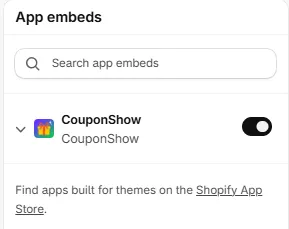
- In the theme editor, check that CouponShow is switched on.
- Click Save at the top right.
- Return to CouponShow and click Check again.
Turn it on from the theme editor
Section titled “Turn it on from the theme editor”- In Shopify admin, go to Online Store and then Themes.
- Click Customize on your current theme.
- Click the App embeds icon in the left toolbar.
- Find CouponShow and switch it on.
- Click Save.
While you are in the theme editor, the box shows a sample offer with a Preview note. Shoppers never see this sample.
Turn it off
Section titled “Turn it off”Open App embeds in the theme editor, switch CouponShow off and click Save. Your promotions stay in the app, and the box stops showing on your store.
Still stuck? Email [email protected] with your store address and a link to the page.
CouponShow by EcomRolodex LTDHomePricingPrivacy policy