How to change the coupon icon position and height
If the icon sits on top of your Add to cart bar or chat button, you can move it in a few seconds.
Move the icon
Section titled “Move the icon”- In CouponShow, open Settings.
- Under Sticky icon, find Icon position.
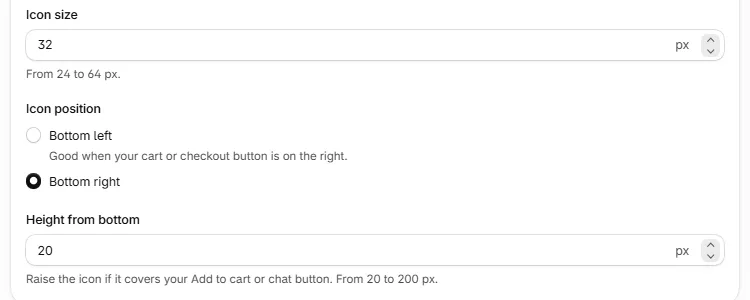
- Choose Bottom left or Bottom right.
- Set Height from bottom, from 20 to 200 px.
- Save your changes.
- Check your store on a real phone.
Choose the right height
Section titled “Choose the right height”Measure the sticky element at the bottom of your phone layout, then set the icon a little higher. If your sticky buy bar is 90 px tall, try a height of 100 to 110 px.
Other icon settings
Section titled “Other icon settings”- Icon: choose from 10 built-in icons.
- Custom icon: upload an SVG, PNG or JPG on a paid plan.
- Icon size: from 24 to 64 px.
- Icon color and Icon background color: match your brand.
- Show promotion count: show or hide the number bubble.
- Allow customers to close sticky button: let shoppers dismiss the icon. Use Reappear after to bring it back after 1 to 168 hours.
Still stuck? Email [email protected] with your store address and a link to the page.
CouponShow by EcomRolodex LTDHomePricingPrivacy policy