How to create your first promotion in CouponShow
A promotion is one offer in your coupon box. It can show a Shopify discount code or a message with no code.
Before you start
Section titled “Before you start”Create the discount in Shopify first, under Discounts. CouponShow displays your code but does not create it or change its rules.
Create the promotion
Section titled “Create the promotion”- In CouponShow, open Promotions and click Create promotion.
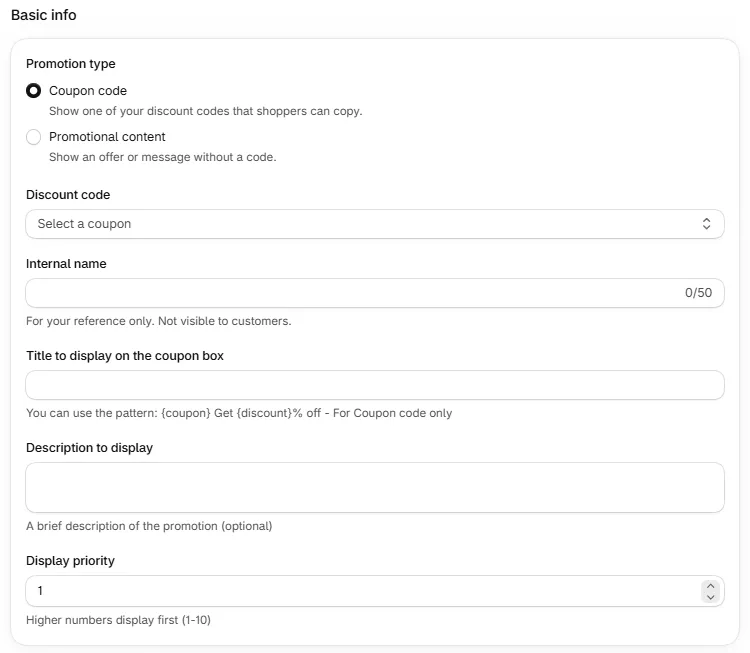
- Under Promotion type, keep Coupon code selected.
- Open Discount code and pick your code. CouponShow fills in the title, terms and end date where it can.
- Add an Internal name so you can find it later. Shoppers do not see this.
- Check Title to display on the coupon box. Write the real offer, such as
20% off your first order. - Add a short Description to display if it helps.
- Keep Enable promotion ticked under Availability.
- Click Save in the bar at the top of Shopify admin.
An enabled promotion goes live as soon as you save it. There is no separate publish step.
If your new code is missing
Section titled “If your new code is missing”The code list can take up to five minutes to pick up a discount you just created. Check that the discount is active in Shopify, wait a moment and reload the page.
Show several offers
Section titled “Show several offers”Use Display priority to set the order. Higher numbers appear first, from 1 to 10. The Free plan allows two enabled promotions at a time. See plans and pricing for the other limits.
Still stuck? Email [email protected] with your store address and a link to the page.